

As the website gains more users or the application processes more requests, it can stop responding quickly to data requests and slow down. As an organization’s IT infrastructure reaches its limits, the website or application becomes inaccessible to users.
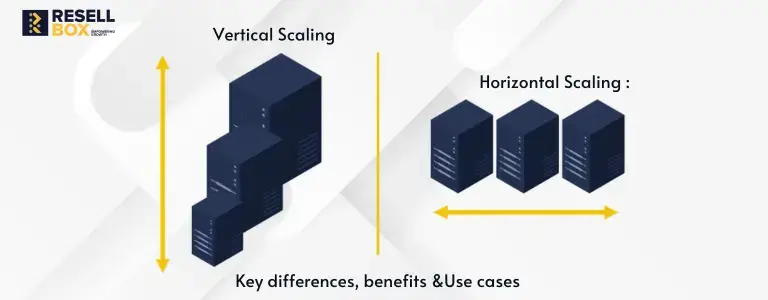
Companies can address this issue by scaling vertically or horizontally. The first option refers to increasing the server capacity by upgrading the existing server, and the second option implies adding more servers to handle larger workloads.
Both approaches have their own advantages and disadvantages, and understanding the differences between them can help companies choose the most cost-efficient and reliable solution.

What Is Vertical Scaling?
Vertical scaling refers to increasing the capacity of a server by upgrading its characteristics, such as CPU, memory, or storage.
For instance, a growing online store might upgrade its server from 8 GB to 32 GB of RAM when the existing memory is no longer sufficient. This can improve performance without requiring the business to distribute the application across multiple servers.
Benefits of Vertical Scaling
- Straightforward upgrades: Increasing server resources can be easier than introducing and configuring additional machines.
- Simpler administration: Teams can manage their applications within an existing server environment without coordinating several new instances.
- More computing power: Additional CPU and memory can help resource-intensive applications process workloads more efficiently.
- Fewer architectural changes: Applications that are not designed for distributed environments may benefit from an upgrade without major code modifications.
Limitations of Vertical Scaling
- Restricted capacity: A server can only support resources up to the limits of its hardware or hosting plan.
- Possible service interruptions: Certain upgrades require a restart or maintenance period, depending on the server and upgrade method.
- Reliability concerns: When an application depends on a single server, a failure can interrupt the entire service.
- Higher upgrade expenses: More powerful server configurations may become costly as computing requirements increase.

What Is Horizontal Scaling?
Horizontal scaling, commonly called scaling out, increases capacity by adding servers or computing instances. These additional machines share the workload instead of relying on a single server to process every request.
For example, an online shopping platform may experience a sharp rise in visitors during a festive promotion. Adding application instances can help distribute customer requests and reduce the pressure on individual servers.
Benefits of Horizontal Scaling
- Expandable capacity: Businesses can introduce additional instances as their workloads grow
- Better fault tolerance: With appropriate redundancy and failover configuration, an application can continue operating when one server becomes unavailable
- Shared workloads: A load balancer can direct incoming requests to different servers to help distribute traffic
- Support for changing demand: Additional instances can help applications accommodate traffic spikes and expanding user bases
Limitations of Horizontal Scaling
- Complex infrastructure: Multiple servers require coordinated configuration, monitoring, and maintenance
- Traffic management: Load balancing must be configured properly to prevent uneven distribution of requests
- Application changes: Some applications need adjustments to manage shared data, user sessions, and communication between instances
- Ongoing expenses: Additional servers can increase hosting, networking, monitoring, and operational costs
Vertical vs. Horizontal Scaling: Key Differences
The main difference between these methods is how they increase computing capacity. Vertical scaling improves the resources of an existing server, whereas horizontal scaling introduces additional servers to share the workload.
| Factor | Vertical Scaling | Horizontal Scaling |
|---|---|---|
| Approach | Increases resources on an existing server | Adds more servers or instances |
| Common term | Scale up | Scale out |
| Capacity | Limited by the server’s maximum resources | Can grow by adding more instances |
| Management | Usually simpler | Requires coordination across servers |
| Downtime | Some upgrades may interrupt services | Can support low-disruption changes with proper configuration |
| Fault tolerance | A single-server setup has a potential single point of failure | Redundancy can improve resilience |
| Suitable for | Smaller applications and certain database workloads | Distributed and high-traffic applications |
Neither method is ideal for every situation. The right choice depends on application requirements, infrastructure costs, expected traffic, and the level of availability a business needs.
Vertical Scaling vs. Horizontal Scaling in Cloud Computing
Cloud computing allows companies to scale their applications according to their needs in a cost-efficient manner. The approach that they can use depends on their specific circumstances and the characteristics of their applications. In particular, organizations can scale their virtual machines vertically by upgrading their resources or purchase additional instances to scale their applications horizontally.
The former option implies increasing the resources of the virtual machine, such as CPU and memory, whereas the latter approach allows companies to launch additional cloud instances that will run their application and help handle more requests.
For instance, a company can first decide to scale up its instance that runs the website to increase the size of the website’s virtual CPU and memory.
At some point, the application may have insufficient resources to handle the increased traffic, and the company may want to scale out its application to redistribute the traffic among multiple instances.
The cloud computing provider can also allow users to scale their applications automatically according to predefined conditions.
Vertical vs. Horizontal Scaling: Real-World Use Cases
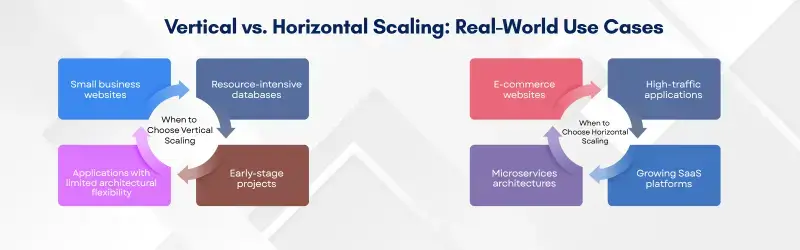
The most suitable scaling approach depends on the application’s workload, design, and future requirements. Understanding common use cases can help businesses make a practical decision.
When to Choose Vertical Scaling
Vertical scaling is worth considering when an application needs more resources but does not require a distributed architecture.
Typical use cases include:
- Small business websites: A server upgrade may provide enough capacity to handle a gradual increase in visitors
- Resource-intensive databases: Additional memory or CPU can help databases that benefit from higher resources, depending on their configuration and workload
- Applications with limited architectural flexibility: Upgrading the existing environment can avoid major changes to applications that are difficult to distribute across servers
- Early-stage projects: Smaller projects can begin with a straightforward setup and increase server capacity as their needs change
When to Choose Horizontal Scaling
Horizontal scaling is useful when a single server cannot efficiently handle the workload or an application needs to distribute requests across several instances.
Common examples include:
- E-commerce websites: Additional instances can help manage traffic increases during major sales and promotional events.
- High-traffic applications: Multiple servers can process requests concurrently, provided the application supports this arrangement.
- Microservices architectures: Individual services can run on additional instances when their specific workloads increase.
- Growing SaaS platforms: Adding instances can help accommodate more customers and application requests.
For horizontal scaling to work effectively, applications may need suitable load balancing, session handling, data consistency, and shared-resource management.
Vertical Scaling vs. Horizontal Scaling: Which Is Better?
The better option depends on what the application needs rather than on the scaling method alone. A simple application may perform well with a larger server, while a rapidly growing platform may benefit from multiple instances.
Vertical scaling is generally a practical choice when an application needs additional resources and a server upgrade can meet that requirement. It usually involves less infrastructure complexity.
Horizontal scaling may be more appropriate when workloads need to be distributed, capacity must expand beyond one server’s limits, or the system requires additional redundancy.
Before choosing a method, evaluate these factors:
- Current CPU, memory, and storage consumption
- Expected growth in traffic and application usage
- Hosting expenses and ongoing maintenance requirements
- Availability targets and acceptable service interruptions
- Application compatibility with multiple servers
Businesses can also start with vertical scaling and introduce horizontal scaling later when their infrastructure needs become more demanding.
Can You Combine Vertical and Horizontal Scaling?
Companies can use both approaches to get the benefits of horizontal and vertical scaling. Thus, organizations can scale their application instances and upgrade the resources of the servers that run their application.
For instance, the organizations can scale out their application by launching several additional instances and then scale up the existing ones to increase their resources. At the same time, companies must keep in mind that these two approaches require additional resources, and they should only scale up or out if their application needs those resources to function properly.
Furthermore, the companies can operate on a hybrid scaling model, which combines the advantages of horizontal and vertical scaling, and rely on the strengths of both methods.
Best Practices for Scaling Your Infrastructure
Scaling works best when businesses understand what is causing performance issues before investing in additional resources. These practices can help improve infrastructure decisions:
- Monitor performance: Review CPU usage, memory consumption, response times, storage activity, and traffic trends to identify changes in workload
- Find the actual bottleneck: Investigate whether the problem originates from the database, application code, server resources, or network
- Forecast resource requirements: Use historical traffic and expected growth to plan capacity ahead of time
- Improve existing performance: Review caching, database queries, and application efficiency before increasing infrastructure capacity
- Configure load balancing: Distribute incoming requests across available instances to reduce uneven workloads
- Calculate total costs: Compare server upgrades with the expenses of adding, monitoring, and maintaining multiple instances
- Validate the results: Test the application after scaling to check whether response times, stability, and resource usage have improved
These steps help businesses select a scaling strategy based on actual requirements instead of spending money on resources that may not address the underlying issue.
Conclusion
Both vertical and horizontal scaling can be appropriate solutions for different applications and organizations. Thus, companies should take their particular circumstances into account when choosing between these two options. Organizations should first analyze their current performance and projected needs and identify the cause of the performance issues. After that, they can evaluate the benefits and limitations of the available options and choose the most beneficial approach.
Both options have their own advantages and disadvantages, and companies should rely on the information about them when making their choice.